
TL;DR: Restaurant menu SEO is the practice of structuring your online menu so Google can index dish names, ingredients and dietary labels as searchable content. A PDF menu contributes zero keyword value and zero AI citation potential. An HTML menu page with proper heading structure, menu schema markup and descriptive dish copy earns organic rankings for specific dish and dietary queries. According to Semrush’s 2025 data, AI Overviews appear on 88 percent of informational queries, including food and restaurant searches. According to Ahrefs’ AI Overview study, only 38 percent of AI citations come from top-10 organic results, which means a well-structured menu page on a local restaurant site can earn AI visibility that a PDF-based competitor never will.
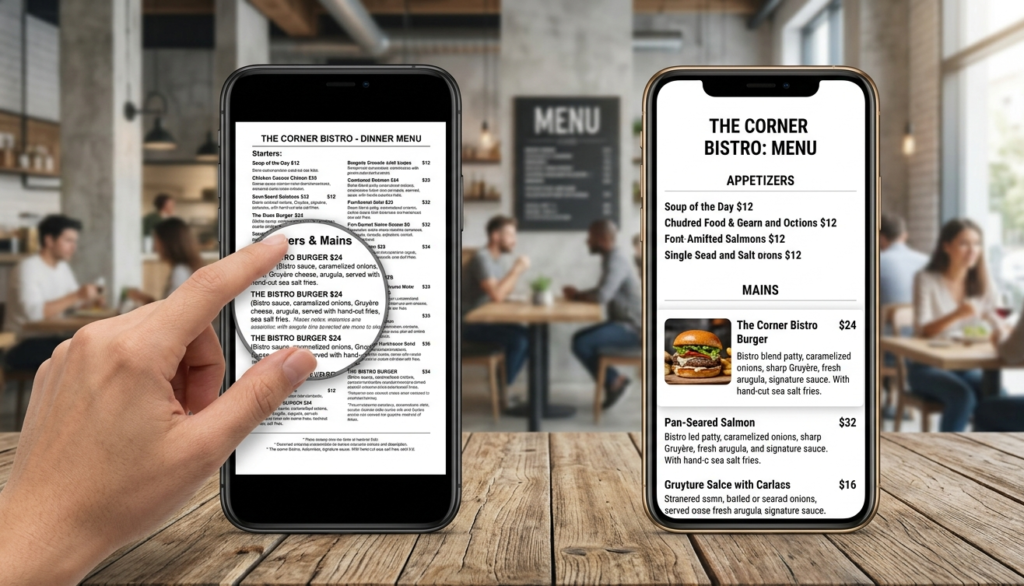
A PDF menu on your restaurant website looks clean to a designer and invisible to Google. Search engines cannot read text locked inside a PDF image scan, and even text-based PDFs earn a fraction of the indexing depth that a properly structured HTML page produces. Meanwhile, a hungry customer asking ChatGPT or Perplexity for a restaurant with gluten-free pasta in their area will only see your name if Google has indexed that information from a crawlable page. Restaurant menu SEO closes that gap. It turns your menu from a static document into a searchable, citable asset that brings in new customers around the clock.
Why a PDF Menu Is Bad for Restaurant SEO
A PDF menu is bad for restaurant SEO because Google cannot crawl it the way it reads a web page. Dish names, ingredient descriptions, dietary labels and pricing all stay locked inside the file and contribute no keyword signals to your domain. As a result, a restaurant with a PDF menu misses every search query for specific dishes, dietary requirements or cuisine descriptions that a properly built HTML page would rank for.
Beyond crawlability, PDFs create a poor mobile experience. A customer opening a restaurant website on a phone and pinching to zoom a multi-column PDF menu is already forming a negative impression before they read a single dish. Google’s Core Web Vitals system also penalises slow-loading pages, and large PDF files load slower than lean HTML pages on mobile connections.
The specific SEO opportunities a PDF menu wastes
- Dish-level keyword indexing: “wood-fired margherita pizza [city]” or “halal lamb chops restaurant [suburb]”
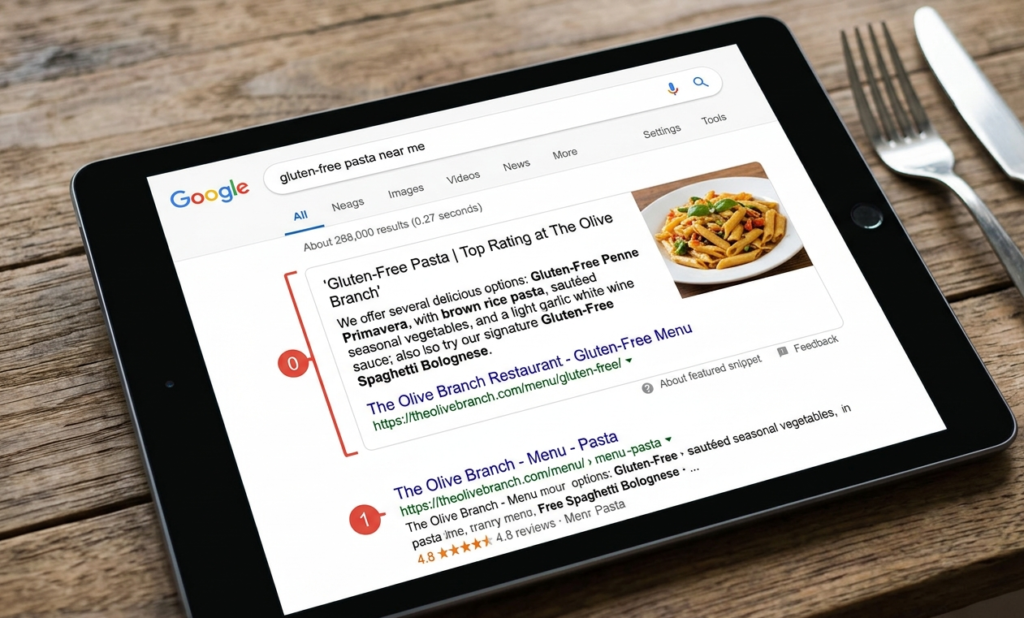
- Dietary filter queries: “gluten-free pasta restaurant near me” or “vegan tasting menu [city]”
- Ingredient-based searches: “truffle risotto restaurant [neighbourhood]”
- AI Overview citations for food and dining queries where structured menu data earns extraction
- Featured snippet eligibility for “what’s on the menu at [restaurant name]” queries
What an HTML Restaurant Menu Page Needs for SEO
A well-optimised HTML restaurant menu page uses H2 headings for each menu section, H3 tags for individual dishes, short descriptive paragraphs for each item and menu schema markup so Google can extract structured data. The page URL should be simple, ideally /menu/, and the page should link directly from the main navigation.
Each dish description needs at least one sentence of genuine copy, not just the dish name and price. That sentence is what Google indexes and what earns keyword relevance for dietary, ingredient or cuisine searches. A dish listed as “Lamb Shank $28” earns nothing. A dish listed as “Slow-braised lamb shank with rosemary jus, served with creamy mash and seasonal greens. Gluten-free.” earns indexable content for at least four different search queries.
According to Google’s structured data documentation for restaurants, the Restaurant schema type and the Menu schema type both improve eligibility for rich results and AI Overview extraction. Adding these markup types to your menu page takes under two hours and produces measurable impressions growth in Google Search Console within 30 to 60 days.
The full HTML menu page structure
| Element | What to include | SEO benefit |
| Page URL | /menu/ or /our-menu/ | Clean indexable path |
| H1 | “Our Menu” or “[Restaurant Name] Menu” | Primary page signal |
| H2 sections | Starters, Mains, Desserts, Drinks | Content segmentation |
| H3 dish names | Individual dish names as headings | Dish-level indexing |
| Dish descriptions | Ingredients, dietary labels, preparation method | Keyword depth |
| Menu schema | JSON-LD with Restaurant and Menu types | Structured data extraction |
| Price display | Listed in HTML text, not image | Crawlable pricing data |
| Last updated note | “Menu updated [Month Year]” | Freshness signal |
How to Add Menu Schema Markup to a Restaurant Website
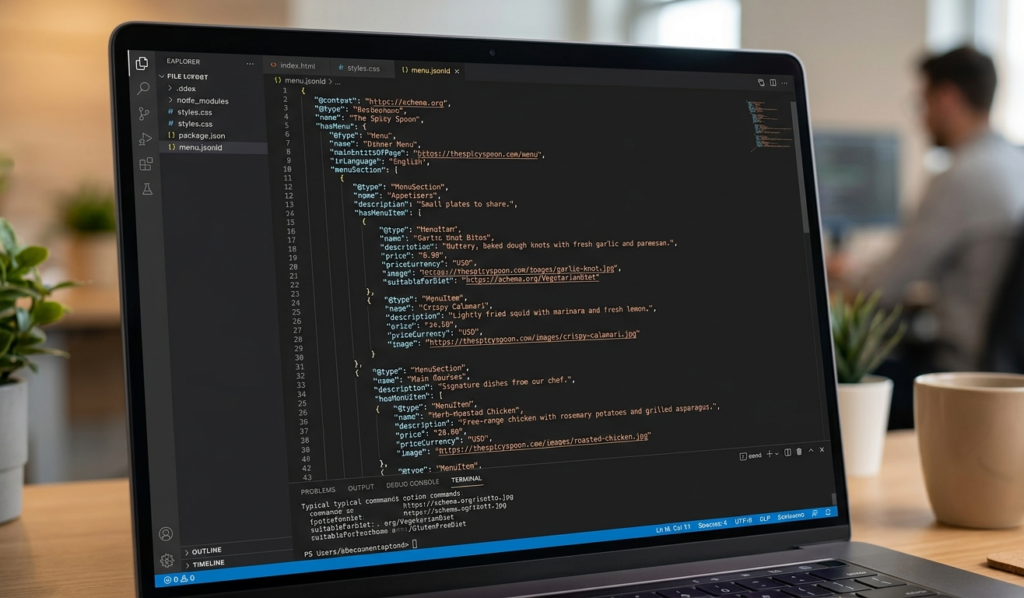
Menu schema markup tells Google exactly which content on your page represents a restaurant menu, which sections are course types and which items are individual dishes. This structured data improves your eligibility for rich results and makes your menu content easier for AI engines to extract and cite in responses about dining options.
The correct schema types for a restaurant menu page are Restaurant (as the parent type), with hasMenu pointing to a Menu object, which contains MenuSection objects for each course and MenuItem objects for each dish. Each MenuItem should include name, description, price and suitableDietry properties where applicable.
Google’s Restaurant schema documentation provides the full specification. Validate your markup with Google’s Rich Results Test before publishing to confirm Google can parse it correctly.
According to Princeton’s 2025 research cited by Search Engine Journal, content with named entities and structured data lifts AI visibility by over 40 percent. A menu page that names specific dishes, ingredients and dietary properties with valid schema markup hits all of those signals simultaneously.
I cover schema strategy and structured content for restaurants and local businesses in more detail on my blog covering local SEO and restaurant search.
Can Google Pull Your Menu Into AI Overviews?
Yes. Google AI Overviews can extract and display restaurant menu information when that information appears on a properly structured, schema-marked HTML page. Queries like “restaurants with halal options in [city]” or “where can I get vegan desserts near [suburb]” trigger AI Overviews that pull directly from indexed restaurant menu pages.
A PDF menu never earns this placement. An HTML menu page with dish-level descriptions, dietary markup and valid Menu schema can. The practical difference is that a restaurant with a PDF menu relies entirely on Google Business Profile data and third-party platforms like TripAdvisor and OpenTable for AI Overview appearances. A restaurant with a well-built HTML menu page also competes directly through its own domain.
For restaurants already following the Google Business Profile and review strategy outlined in my local SEO for restaurants guide, the HTML menu page is the next highest-impact content asset to build or fix.
How Often Do Restaurant Menu Prices and Items Need Updating?
Update your menu page every time prices, dishes or seasonal offerings change. Stale menu data creates two problems: customer frustration when the website lists a dish that no longer exists, and a freshness penalty from Google that favours competitors with more recently updated content.
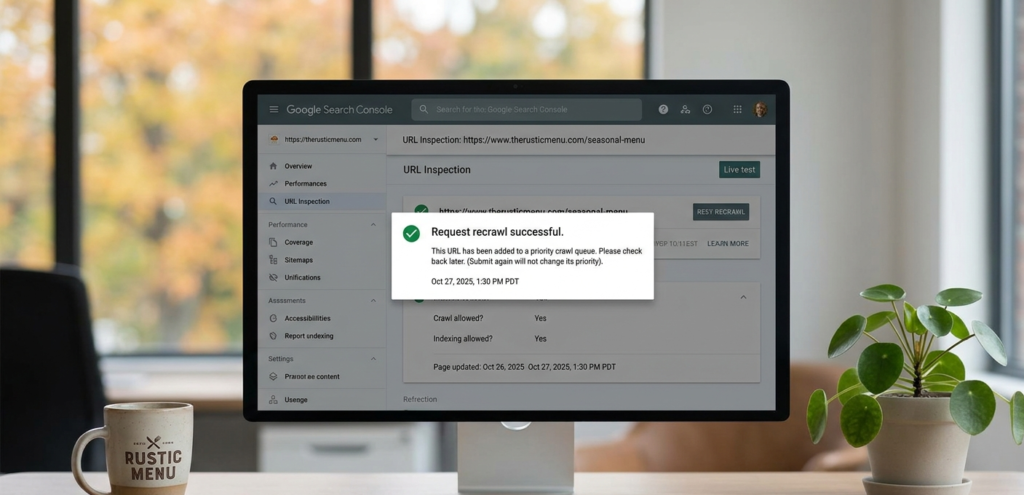
The practical solution is to add a “Menu last updated [Month Year]” note at the top of the page and treat every seasonal menu change as a content update event. Each update triggers a recrawl signal in Google Search Console, which keeps your page competitive with recently published or refreshed competitor pages.
For restaurants with quarterly seasonal menus, a structured update process once every three months, covering pricing, dish names and descriptions, keeps the page current without requiring a full rebuild. Add the page to your Google Search Console property and use the URL inspection tool to request a recrawl after each significant update.
My restaurant and local business SEO content services include menu page builds and quarterly update support for restaurants that want consistent search visibility without managing the technical side themselves.
Want a Menu Page That Actually Brings in Customers?
Most restaurants upload a PDF and consider the job done. But a properly structured HTML menu page with schema markup, dish-level descriptions and dietary labels turns your menu into a 24-hour marketing asset. It earns organic rankings, AI Overview citations and direct bookings from customers who found exactly what they were looking for. If you want that page built or your current menu page audited and fixed, take a look at my restaurant SEO content services or get in touch directly. I will tell you what your current menu is costing you in missed search traffic before we agree on anything.
FAQs
Why is a PDF menu bad for restaurant SEO?
Google cannot crawl a PDF the way it reads an HTML web page. Dish names, dietary labels and ingredient descriptions inside a PDF contribute no keyword signals to your domain. So a PDF menu earns zero rankings for specific food queries, zero AI Overview citations and zero featured snippet eligibility. It also loads slowly on mobile and forces visitors to pinch-zoom on small screens, which increases bounce rates and worsens the user experience signals Google uses in its quality assessment.
Should my restaurant menu have its own page for each dish?
No, not for most restaurants. One well-structured menu page using H2 headings for course sections and H3 headings for individual dishes with brief descriptions covers the full SEO need. A separate page per dish only makes sense for restaurants running active paid campaigns or content programmes around specific signature items. For local SEO, one comprehensive HTML menu page with valid schema markup and dish-level descriptions outperforms twenty thin single-dish pages every time.
How do I add menu schema markup to my restaurant website?
Add a JSON-LD script block to your menu page using the Restaurant schema type as the parent, with hasMenu pointing to a Menu object. Inside the Menu, create MenuSection objects for each course type and MenuItem objects for each dish, including name, description, price and suitableDietary where applicable. Validate the markup with Google’s Rich Results Test before publishing. If your site runs on WordPress, plugins like Yoast SEO or RankMath allow manual JSON-LD entry without touching the theme code.
Do I need to update menu prices on my website every time they change?
Yes. Stale pricing on your website creates customer frustration and signals outdated content to Google. Each price or item change is an opportunity to trigger a recrawl of your menu page, which keeps the page competitive with fresher competitor content. Add a “Menu last updated [Month Year]” line at the top of the page and use Google Search Console’s URL inspection tool to request a recrawl after each update. For seasonal menus, a quarterly update schedule is both practical and sufficient.
Can Google pull my restaurant menu into AI Overviews?
Yes, but only from an HTML menu page with valid schema markup. Google AI Overviews extract restaurant menu information for queries about dietary options, cuisine types and specific dishes in specific locations. A PDF menu never earns this placement because Google cannot read its contents as structured data. An HTML menu page with Menu schema, dish descriptions and dietary labels can appear in AI Overviews for food-specific queries, giving your restaurant visibility that competitors without structured menus simply cannot access.