
Keys Takeaways: A content audit checklist tells you which blog posts to keep, refresh or cut. That call rests on three signals: organic traffic, keyword ranking position and whether the post still matches current search intent. Orbit Media’s 2024 Annual Blogger Survey found that bloggers who update older posts are twice as likely to report strong content marketing results. A solid SEO content audit also covers metadata, internal links and on-page structure, not just traffic numbers. Most small business blogs can process 50 to 100 posts in two to four hours using Google Search Console and a basic spreadsheet. Run this process every six months and your best posts stay on page one instead of quietly sliding into page-three territory.

Most small business blogs spend years publishing new content while the old posts slide from page one to page three without anyone noticing. A post that ranked eighth for a strong keyword two years ago might sit at position 26 today, generating no clicks, earning no links and helping no one. But it’s not worthless. It’s fixable. A content audit checklist gives you a clear, repeatable way to find those posts and decide whether to update them, consolidate them or cut them. I run this process for every blog I manage and write for, and you can see the strategy behind the work I do at wajahatamin.com. Publishing new posts into a blog that’s already leaking rankings is one of the most common mistakes small business owners make.
What Does a Content Audit Checklist Actually Cover?
A content audit checklist covers six categories: URL status, organic traffic, keyword ranking positions, metadata quality, internal link structure and content freshness. These six checks tell you whether a post is performing, stagnating or actively working against your site’s authority. Each check takes about two to three minutes per URL when the right tools are open.
Traffic data alone won’t tell you why a post underperforms, so you need more than one signal to make a confident decision. A post with 200 monthly visitors might rank for 40 low-intent queries and convert nobody. By contrast, a post with 30 monthly visitors might sit at position 14 for a keyword with real buying intent, needing only a sharper title tag to break into the top ten.
Here’s a quick-reference view of what each check includes:
| Check | What You’re Looking For |
| URL status | 200 OK, no redirect chains or soft 404 errors |
| Organic traffic | Clicks and impressions from Google Search Console, 12-month range |
| Keyword rankings | Positions 1 to 50 tracked in Ahrefs or Semrush |
| Metadata | Title tag length, meta description presence, keyword alignment |
| Internal links | Posts with zero inbound links from other pages on your site |
| Content freshness | Last updated date, outdated statistics, broken external links |
Because this checklist is modular, you can run a light version in two hours or a full version over a day. The scope depends on how many URLs you’re auditing.
How Do You Build Your Blog Inventory Before You Start?
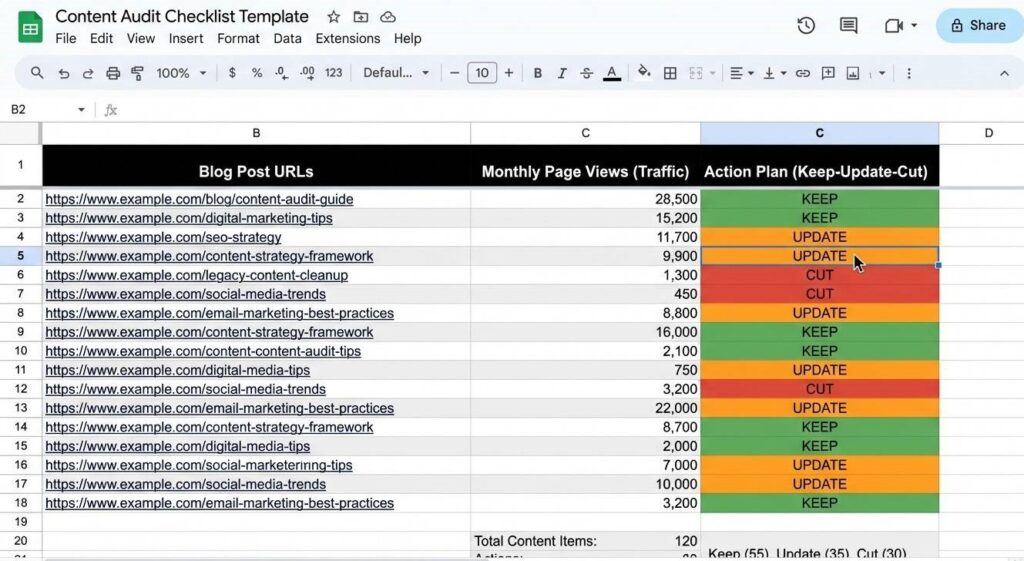
Before any SEO content audit, you need a complete list of blog URLs with traffic and ranking data attached to each one. Export your /blog/ section from Google Search Console, crawl those same URLs with Screaming Frog and pull keyword positions from Ahrefs or Semrush. Those three sources feed one spreadsheet that becomes your audit workspace for every decision you make.
Tools That Make the Inventory Fast
Google Search Console gives you up to 16 months of per-URL traffic data, filterable by page path. Export the Performance report for your /blog/ directory and you’ll see exactly which posts earn clicks and which search queries trigger impressions. This step takes under 20 minutes for most small blogs.
Screaming Frog’s SEO Spider crawls your blog and returns status codes, title tag lengths, meta descriptions, H1s and internal link counts for every URL. The free version handles up to 500 URLs, which covers the majority of small business blogs without a paid subscription.
The Spreadsheet Columns You Actually Need
You don’t need 30 columns. You need six:
- URL (from the Screaming Frog crawl)
- Clicks over the last 12 months (from Search Console)
- Impressions over the last 12 months (from Search Console)
- Top keyword and its position (from Ahrefs or Semrush)
- Word count (from Screaming Frog)
- Action: Keep, Update or Cut (the column you fill in during the review)
That last column is the whole point of the exercise.
How Do You Decide What to Keep, Update or Cut?
Keep any post with consistent organic clicks or a ranking in the top 20 for a relevant keyword. Update posts that rank between positions 11 and 40 with decent impressions but low click-through rates. Cut or consolidate posts with zero traffic, zero impressions and no backlinks over 12 consecutive months. Duplicate topic coverage is also a cut-or-merge candidate regardless of traffic.
The keep-update-cut decision gets easier when you set thresholds before reviewing individual URLs. Otherwise every post feels worth saving and audits stall.
The framework I use across specialty business clients on my SEO content writing services page follows three categories:
Keep a post if it gets 50 or more organic clicks per month, ranks in the top 20 for its primary keyword or has at least three inbound internal links from other posts on the site.
Update a post if it ranks between positions 11 and 40 with high impressions but low clicks, covers a topic correctly but misses current search intent or has outdated statistics and broken links.
Cut or merge a post if it has had zero organic clicks and zero impressions for 12 straight months, covers the same topic as a stronger existing post or ranks only for irrelevant keywords with no business value.
Before cutting anything, check whether that post carries internal links pointing to other pages. If it does, update those links first and set a 301 redirect to the most relevant live URL. The content brief template I cover here helps you avoid publishing duplicate-topic posts in the first place, which makes every future audit significantly faster.
What Should You Actually Change in a Content Refresh?
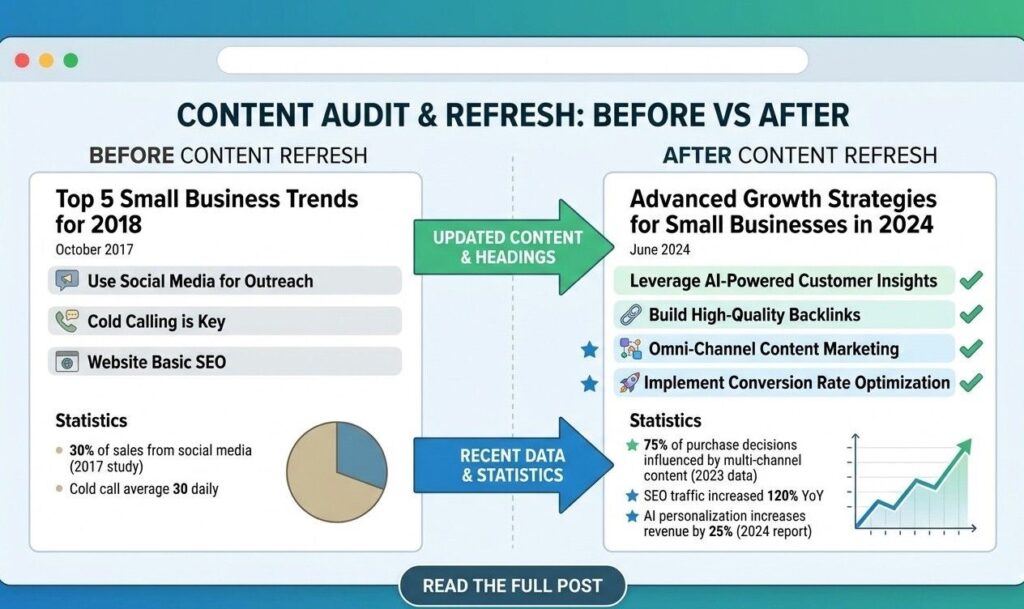
A content refresh targets specific gaps rather than the whole article. Update the title tag, meta description and H1 first. Then replace any statistics older than 18 months, add internal links to newer posts and rewrite H2 sections that no longer match the keyword’s current search intent. A focused refresh takes 45 to 90 minutes per post and typically delivers ranking movement within four to eight weeks.
On-Page SEO Elements to Fix First
Metadata is the fastest-impact fix in any content refresh. An outdated title tag with no year signal, a missing meta description or an H1 that doesn’t reflect the post’s actual target keyword are issues that cost you clicks every day they stay unfixed. Start there.
After metadata, run the post through Semrush’s On Page SEO Checker to find semantic coverage gaps. This tool shows which related terms your top-ranking competitors cover that your post doesn’t. Adding those terms naturally into subheadings and body copy improves topical depth, which now matters far more than raw keyword repetition. For a clear explanation of why semantic signals have replaced density as the primary on-page ranking factor, the semantic SEO vs keyword density breakdown here covers the shift in practical detail.
Content Quality Signals to Update
After on-page elements, focus on three quality signals.
Accuracy. Replace any statistics older than 18 months. According to Semrush’s 2025 State of Content Marketing report, Google’s AI Overviews now appear on 88 percent of informational queries. Stale data in a post that triggers an AI Overview reaches more readers than it would have two years ago, which makes outdated information a bigger credibility risk than before. For a deeper look at how to structure content so AI engines cite it directly, the generative engine optimization guide here covers the structural decisions that raise citation probability.
Structure. Rewrite any H2 that’s vague or decorative. Question-format H2s are more likely to be pulled as direct answer capsules by tools like ChatGPT and Perplexity. If your headings currently read like topic labels, rewrite them as questions that real people type.
Freshness signal. Update the published date only after making substantive content changes. Changing the date without changing the content is a manipulation tactic Google recognizes and ignores.
Ready to Get More from the Blog Content You Already Have?
You don’t need more posts. You need a clear picture of what’s working and a real plan for everything else. If you’d rather skip the spreadsheet setup and bring in someone who runs these audits regularly, let’s talk about your blog. I work with small businesses across therapy, real estate, contractor services and B2B content on audits, content strategy and SEO writing. Share your blog URL and we’ll figure out exactly where the ranking growth is sitting.
Frequently Asked Questions
How often should I do a content audit?
A full content audit every six months works well for most small business blogs. If you publish fewer than two posts per month, once a year may be enough. The goal is to catch posts drifting from page one before the traffic drop becomes severe. Google’s core algorithm updates throughout 2024 and 2025 hit mid-tier content harder than previous updates did, so shorter audit cycles are worth the time investment for any blog actively publishing content. According to Ahrefs’ 2024 blogging statistics report, 74 percent of bloggers now update old content regularly.
Should I delete old blog posts that get no traffic?
Don’t delete without checking first. A post with zero clicks but 300 monthly impressions may only need a better title tag to start earning traffic. True deletion candidates have zero clicks, zero impressions and zero backlinks over 12 months with no informational value that a stronger post doesn’t already cover. Always redirect deleted URLs with a 301 to the most relevant live page. Skipping the redirect turns deleted posts into 404 errors that break your internal link structure and waste any existing authority those URLs carry.
What should I change in a content refresh?
Start with metadata: update the title tag, rewrite the meta description and check the H1 for keyword alignment. Then replace outdated statistics, add internal links to relevant newer posts and rewrite H2 sections that no longer match search intent. You don’t need to rewrite the full article. Use Semrush or Ahrefs to compare your post against the pages currently ranking above you and target only the specific gaps between your coverage and theirs. The NP Digital content audit guide also covers the step-by-step data review in detail if you want a second framework to reference.
How long does a content audit take for a small blog?
A blog with 50 to 100 posts typically takes three to five hours for a solo audit from data export to completed action plan. The crawl and export step takes under an hour. Reviewing each URL is the longest part, at roughly two minutes per post when your spreadsheet is set up correctly. Your second audit will take about half the time because the spreadsheet structure already exists and you’re only reviewing changes since the previous cycle.
Does merging two blog posts hurt rankings?
Merging two posts doesn’t hurt rankings when it’s done correctly. Choose the stronger URL as the canonical version, set a 301 redirect from the weaker URL to it and combine the best content from both into one stronger page. The merged post typically outranks either individual post because it concentrates authority and removes keyword cannibalization. The risk comes from skipping the redirect entirely, which leaves the deleted URL returning a 404 error and breaks any backlinks pointing to it from external sites.